|

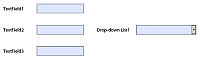
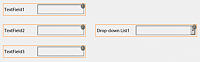
Este exemplo mostra como excluir um objeto da sequência de tabulação padrão. Neste exemplo, o usuário começa em TextField1 e usa o botão Tab para navegar até TextField2 e depois para TextField3. No entanto, o objeto de lista suspensa, DropDownList1, é configurado para ser exibido quando o cursor do usuário acessa TextField2.
Neste caso, por padrão, a experiência do usuário o levaria a seguir a sequência na seguinte ordem:
Para excluir DropDownList1 da sequência de tabulação, adicione os seguintes scripts ao objeto TextField2:
Evento
|
Script
|
|---|
enter
|
// This conditional statement displays DropDownList3 to the user // and sets the focus of the client application to TextField2. se (DropDownList3.presence != "visible") { DropDownList3.presence = "visible"; xfa.host.setFocus(this); }
|
exit
|
// This conditional statement tests to see if the user is // pressing the Shift key while pressing the Tab key. If Shift is // held down, then the client application focus returns to // TextField1, otherwise the focus is set to TextField3. The // experience for the user is that DropDownList3 is not a // part of the tabbing order. var isShiftDown = xfa.event.shift; if (isShiftDown) { xfa.host.setFocus(TextField1); } else { xfa.host.setFocus(textField3); }
|
|
|
|