控制文字Flash Player 10 以及更新的版本,Adobe AIR 1.5 以及更新的版本 FTE 提供一組新的文字格式控制項,以處理對齊和字元間距 (特殊字距和字距調整)。也有屬性可控制斷行方式,以及在字行內設定定位停駐點。 對齊文字對齊文字時,會調整單字 (有時是字母) 之間的間距,讓段落中的所有字行都有相同的長度。此功能的作用是對齊兩側的文字,而單字和字母之間的間距將會有所不同。報紙和雜誌中的文字欄經常會是對齊的。 SpaceJustifier 類別中的 lineJustfication 屬性可讓您控制文字區塊中的字行對齊。LineJustification 類別會定義用來指定對齊選項的常數:ALL_BUT_LAST 對齊所有文字行,但不含最後一行;ALL_INCLUDING_LAST 對齊所有文字,包含最後一行;UNJUSTIFIED 不對齊文字 (預設值)。 若要對齊文字,請將 lineJustification 屬性設為 SpaceJustifier 類別實體,並將該實體指定給 TextBlock 實體的 textJustifier 屬性。下列範例會建立一個段落,而該段落除了最後一行之外,其他所有的文字行都是對齊的。 package
{
import flash.text.engine.*;
import flash.display.Sprite;
public class JustifyExample extends Sprite
{
public function JustifyExample()
{
var str:String = "Lorem ipsum dolor sit amet, consectetur adipisicing elit, " +
"sed do eiusmod tempor incididunt ut labore et dolore magna aliqua. Ut " +
"enim ad minim veniam, quis nostrud exercitation ullamco laboris nisi ut " +
"aliquip ex ea commodo consequat.";
var format:ElementFormat = new ElementFormat();
var textElement:TextElement=new TextElement(str,format);
var spaceJustifier:SpaceJustifier=new SpaceJustifier("en",LineJustification.ALL_BUT_LAST);
var textBlock:TextBlock = new TextBlock();
textBlock.content=textElement;
textBlock.textJustifier=spaceJustifier;
createLines(textBlock);
}
private function createLines(textBlock:TextBlock):void {
var yPos=20;
var textLine:TextLine=textBlock.createTextLine(null,150);
while (textLine) {
addChild(textLine);
textLine.x=15;
yPos+=textLine.textHeight+2;
textLine.y=yPos;
textLine=textBlock.createTextLine(textLine,150);
}
}
}
}
若要讓字母以及單字之間的間距不同,請將 SpaceJustifier.letterspacing 屬性設為 true。開啟字母間距可以減少單字之間出現不美觀之間隔的機率,這種情況有時會在使用簡單對齊時發生。 對齊東亞文字若要對齊東亞文字,必須進行額外考量。這些文字可以從上到下書寫,且部分字元 (稱為避頭尾字元) 不能出現在行首或行尾。JustificationStyle 類別會定義下列常數以指定處理這些字元的選項。PRIORITIZE_LEAST_ADJUSTMENT 依據展開或壓縮字行 (視哪種可以產生最想要的結果而定) 來進行對齊。PUSH_IN_KINSOKU 依據在行尾壓縮避頭尾字元來對齊,或當沒有避頭尾字元或該空間不足時,展開字行來對齊。 PUSH_OUT_ONLY 依據展開字行來進行對齊。若要建立垂直亞洲文字區塊,請將 TextBlock.lineRotation 屬性設為 TextRotation.ROTATE_90,並將 ElementFormat.textRotation 屬性設為 TextRotation.AUTO (預設值)。將 textRotation 屬性設為 AUTO 後,文字中的字符會保持垂直,而不會在旋轉字行一起旋轉。AUTO 設定只會針對全形字和全字符逆時針旋轉 90 度 (由字符的 Unicode 屬性所決定)。下列範例會顯示垂直的日文文字區塊,並使用 PUSH_IN_KINSOKU 選項來進行對齊。
package
{
    import flash.text.engine.*;
    import flash.display.Stage;
    import flash.display.Sprite;
    import flash.system.Capabilities;

    public class EastAsianJustifyExample extends Sprite
    {
        public function EastAsianJustifyExample()
        {
            var Japanese_txt:String = String.fromCharCode(
            0x5185, 0x95A3, 0x5E9C, 0x304C, 0x300C, 0x653F, 0x5E9C, 0x30A4,
            0x30F3, 0x30BF, 0x30FC, 0x30CD, 0x30C3, 0x30C8, 0x30C6, 0x30EC,
            0x30D3, 0x300D, 0x306E, 0x52D5, 0x753B, 0x914D, 0x4FE1, 0x5411,
            0x3051, 0x306B, 0x30A2, 0x30C9, 0x30D3, 0x30B7, 0x30B9, 0x30C6,
            0x30E0, 0x30BA, 0x793E, 0x306E)
            var textBlock:TextBlock = new TextBlock();
            var font:FontDescription = new FontDescription();
            var format:ElementFormat = new ElementFormat();
            format.fontSize = 12;
            format.color = 0xCC0000;
            format.textRotation = TextRotation.AUTO;
            textBlock.baselineZero = TextBaseline.IDEOGRAPHIC_CENTER;
            var eastAsianJustifier:EastAsianJustifier = new EastAsianJustifier("ja", LineJustification.ALL_BUT_LAST);
            eastAsianJustifier.justificationStyle = JustificationStyle.PUSH_IN_KINSOKU;
            textBlock.textJustifier = eastAsianJustifier;
            textBlock.lineRotation = TextRotation.ROTATE_90;
            var linePosition:Number = this.stage.stageWidth - 75;
            if (Capabilities.os.search("Mac OS") > -1)
                // set fontName: Kozuka Mincho Pro R
                font.fontName = String.fromCharCode(0x5C0F, 0x585A, 0x660E, 0x671D) + " Pro R";
            else
                font.fontName = "Kozuka Mincho Pro R";
            textBlock.content = new TextElement(Japanese_txt, format);
            var previousLine:TextLine = null;

            while (true)
            {
                var textLine:TextLine = textBlock.createTextLine(previousLine, 200);
                if (textLine == null)
                    break;
                textLine.y = 20;
                textLine.x = linePosition;
                linePosition -= 25;
                addChild(textLine);
                previousLine = textLine;
            }
        }
    }
}
特殊字距和字距調整特殊字距和字距調整會影響文字區塊中相鄰字元組之間的距離。特殊字距可控制字元組如何相互「搭配」(例如「WA」或「Va」)。特殊字距設定於 ElementFormat 物件中。預設為啟用 (Kerning.ON),而且可以設為 OFF 或 AUTO,在啟用的情況下,如果不是漢字、平假名或片假名,則特殊字距只會套用至字元之間。 字距調整會在文字區塊中的所有字元之間加上或減去固定的像素數,而且也會設定於 ElementFormat 物件中。它可用於內嵌和裝置字體。FTE 支援兩個字距調整屬性:trackingLeft 會從字元左邊加上/減去像素,而 trackingRight 會從右邊加上/減去像素。如果使用特殊字距,則會在每個字元組的特殊字距值加上或減去字距調整值。 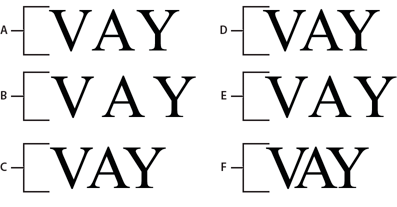
var ef1:ElementFormat = new ElementFormat(); ef1.kerning = Kerning.OFF; var ef2:ElementFormat = new ElementFormat(); ef2.kerning = Kerning.ON; ef2.trackingLeft = 0.8; ef2.trackingRight = 0.8; var ef3:ElementFormat = new ElementFormat(); ef3.trackingRight = -0.2; 繞排文字的斷行ElementFormat 物件的 breakOpportunity 屬性會決定當繞排文字分成多行時,哪些字元可用於斷行。預設值 BreakOpportunity.AUTO 使用的是標準 Unicode 屬性 (例如在單字之間斷行以及連字號處斷行)。使用 BreakOpportunity.ALL 可將任何字元視為斷行機會,而這適用於在路徑中將文字斷行的效果。 var ef:ElementFormat = new ElementFormat(); ef.breakOpportunity = BreakOpportunity.ALL; 定位停駐點若要在文字區塊中設定定位停駐點,請建立 TabStop 類別實體以定義定位停駐點。TabStop() 建構函式的參數會指定如何對齊文字與定位停駐點。這些參數會指定定位停駐點的位置以及要對齊的值 (針對小數點對齊,並以字串表示)。此值一般是小數點,但也可以是逗點、貨幣符號、日元符號或歐元符號 (舉例來說)。下行的程式碼會建立定位停駐點 tab1。 var tab1:TabStop = new TabStop(TabAlignment.DECIMAL, 50, "."); 一旦建立文字區塊的定位停駐點之後,請將它們指定給 TextBlock 實體的 tabStops 屬性。因為 tabStops 屬性需要 Vector,所以請先建立 Vector 並在其中新增定位停駐點。Vector 可讓您將一組定位停駐點指定給文字區塊。下列範例會建立 Vector<TabStop> 實體,並在其中新增一組 TabStop 物件。然後,它會將定位停駐點指定給 TextBlock 實體的 tabStops 屬性。 var tabStops:Vector.<TabStop> = new Vector.<TabStop>(); tabStops.push(tab1, tab2, tab3, tab4); textBlock.tabStops = tabStops 如需有關 Vector 的詳細資訊,請參閱使用陣列。 下列範例會顯示每個 TabStop 對齊選項的效果。 package {
import flash.text.engine.*;
import flash.display.Sprite;
public class TabStopExample extends Sprite
{
public function TabStopExample()
{
var format:ElementFormat = new ElementFormat();
format.fontDescription = new FontDescription("Arial");
format.fontSize = 16;
var tabStops:Vector.<TabStop> = new Vector.<TabStop>();
tabStops.push(
new TabStop(TabAlignment.START, 20),
new TabStop(TabAlignment.CENTER, 140),
new TabStop(TabAlignment.DECIMAL, 260, "."),
new TabStop(TabAlignment.END, 380));
var textBlock:TextBlock = new TextBlock();
textBlock.content = new TextElement(
"\tt1\tt2\tt3\tt4\n" +
"\tThis line aligns on 1st tab\n" +
"\t\t\t\tThis is the end\n" +
"\tThe following fragment centers on the 2nd tab:\t\t\n" +
"\t\tit's on me\t\t\n" +
"\tThe following amounts align on the decimal point:\n" +
"\t\t\t45.00\t\n" +
"\t\t\t75,320.00\t\n" +
"\t\t\t6,950.00\t\n" +
"\t\t\t7.01\t\n", format);
textBlock.tabStops = tabStops;
var yPosition:Number = 60;
var previousTextLine:TextLine = null;
var textLine:TextLine;
var i:int;
for (i = 0; i < 10; i++) {
textLine = textBlock.createTextLine(previousTextLine, 1000, 0);
textLine.x = 20;
textLine.y = yPosition;
addChild(textLine);
yPosition += 25;
previousTextLine = textLine;
}
}
}
}

|

|



