|

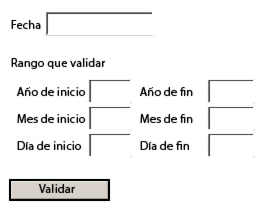
El recorte Validar una fecha muestra una validación de fecha basada en un intervalo de fechas que introduce el usuario.
En este ejemplo, el usuario selecciona una fecha de un calendario y, a continuación, especifica las fechas inicial y final con las que validar la fecha especificada. El formulario compara la fecha especificada con el intervalo de fechas e informa de si el año, mes y día especificados son válidos.
 Agregar una secuencia de comandos al botón Validarform1.#subform[0].Button1::click - (JavaScript, client)
Status.clearItems(); //Clear the status listbox.
// Create a date() for parsing information.
var sDate = Date.rawValue;
var oDate = util.scand("yyyy-mm-dd", sDate);
if(oDate == null)
{
xfa.host.messageBox("Pleae enter a valid date.");
exit;
}
// Store date values.
var nYear = oDate.getFullYear();
var nMonth = oDate.getMonth() + 1; // 0 based
var nDay = oDate.getDate();
// Validation flags.
var bStartYear = false;
var bEndYear = false;
var bStartMonth = false;
var bEndMonth = false;
var bStartDay = false;
var bEndDay = false;
// Validate the year range.
if((StartYear.rawValue == null) || (StartYear.rawValue <= nYear))
bStartYear = true;
if((EndYear.rawValue == null) || (EndYear.rawValue >= nYear))
bEndYear = true;
if(bStartYear && bEndYear)
Status.addItem("valid year");
else
Status.addItem("invalid year");
// Validate the month range.
if((StartMonth.rawValue == null) || (StartMonth.rawValue <= nMonth))
bStartMonth = true;
if((EndMonth.rawValue == null) || (EndMonth.rawValue >= nMonth))
bEndMonth = true;
if(bStartMonth && bEndMonth)
Status.addItem("valid month");
else
Status.addItem("invalid month");
// Validate the day range.
if((StartDay.rawValue == null) || (StartDay.rawValue <= nDay))
bStartDay = true;
if((EndDay.rawValue == null) || (EndDay.rawValue >= nDay))
bEndDay = true;
if(bStartDay && bEndDay)
Status.addItem("valid day");
else
Status.addItem("invalid day");
Para ver ejemplos similares, visite LiveCycle Developer Center.
|
|
|


