|

The Opening
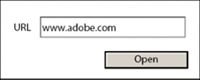
an Application snippet demonstrates opening a browser to a user-specified
URL and a file in Acrobat or Adobe® Reader® from a form.
In this example, when the Open button is clicked, the user-specified
URL opens in a separate browser container.
To add script to open a browser to a user-specified URL

Add the following script to the Open button:
app.launchURL(TextField1.rawValue, true);
In
this example, when the Open button is clicked, the user-specified
URL opens in the current container.
To add script to open a browser to a user-specified URL
Add the following script to the Open button:
xfa.host.gotoURL(TextField2.rawValue, 0);
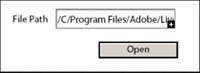
In
this example, when the Open button is clicked, the user-specified
PDF file opens in Acrobat or Adobe Reader.
To add script to open a user-specified PDF file
Add
the following script to the Open button:
app.openDoc(FilePath.rawValue);
To
see similar examples, visit the
AEM forms Developer Center
.
|
|
|