|

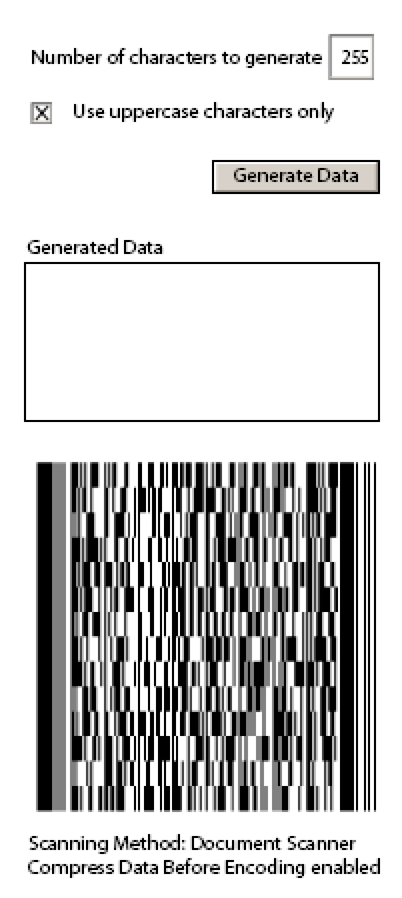
Anhand des Formularbausteins „Verwenden eines Papierformular-Barcodes“ wird die Kapazität eines Papierformular-Barcodes demonstriert. Zudem wird die Auswirkung auf die Datenkapazität demonstriert, wenn Groß- und Kleinbuchstaben sowie Sonderzeichen in den Daten enthalten sind.
Bei Eingabe von weniger als 255 Zeichen und anschließendem Klick auf die Schaltfläche „Daten erstellen“ ändert sich in diesem Beispiel die Datenkapazität des Barcodes. Analog reduziert sich auch bei deaktiviertem Kontrollkästchen „Nur Großbuchstaben“ die Datenkapazität des Barcodes.
So fügen Sie dem Textfeld „Anzahl zu erstellender Zeichen“ Skript hinzu
form1.#subform[0].CharstoGen::validate - (JavaScript, client)
// The maximum number of characters to generate is 255.
if (this.rawValue > 255)
{
    this.rawValue = 255;
    false;
}
So fügen Sie dem Kontrollkästchen „Nur Großbuchstaben“ Skript hinzu
form1.#subform[0].UpperCaseOnly::change - (JavaScript, client)
if (this.rawValue == 1)
{
    CharacterBase.value = " ABC DEF GHI JKL MNO PQR STU VWX YZ,";
}
else
{
    CharacterBase.value = " ABC DEF GHI JKL MNO PQR STU VWX YZa bcd efg hij klm nop qrs tuv wxy z01 234 567 890 <xml>,";
    xfa.host.messageBox("When data is encoded into a PDF417 barcode, all UPPER CASE data requires less space in a barcode.  When switching back and forth from upper case to lower case, special characters must be embedded into the barcode to let the decoder or scanner know that a case change has taken place.  As you will be able to see from the example, the data capacity of the barcode is reduced when mixed cases are used.", "Upper Case" ,3, 1);
}

if (CharstoGen.rawValue >= 255)
    CharstoGen.rawValue = 255;
So fügen Sie der Schaltfläche „Daten exportieren“ Skript hinzu
form1.#subform[0].Button1::click - (JavaScript, client)
// Display random data in Paper Form barcode.
var RandomLetters = "";
var sequence = "";
var FieldFillSize = 0;
var nIndex = 0;

RandomLetters = CharacterBase.value;
FieldFillSize = CharstoGen.rawValue;

for (var i = 1; i <= FieldFillSize; i++)
{
    nIndex = Math.floor(Math.random() * RandomLetters.length);
    sequence = sequence + RandomLetters.charAt(nIndex);
}

BarcodeData.rawValue = sequence;
So fügen Sie dem Barcode Skript hinzu
BarcodeData.rawValue = sequence;
    form1.#subform[0].Barcode::calculate - (JavaScript, client)
//{{Start Generated Content//
var is705ViewerRequired = false;
//End Generated Content}}//

function createBarcodeContent()
{
       // TODO: Encode your barcode content here
       var barcodeContent = " ";
       barcodeContent = BarcodeData.rawValue;
       return barcodeContent;
}

// Assign content to the barcode.
// Note: Do not assign a null value to
// the barcode. Otherwise, the barcode is
// displayed as blank.
if(createBarcodeContent() != null)
{
       this.rawValue = createBarcodeContent();
}
else
{
       this.rawValue = " ";
}
// Final sanity check, located here not for
// efficiency but for consistency and correctness
if (is705ViewerRequired && xfa.host.version < 7.05)
{
       this.rawValue = " ";
}
Weitere ähnliche Beispiele finden Sie im
AEM forms Developer Center
.
|
|
|