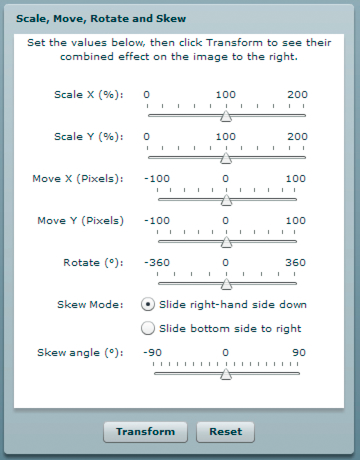
The MatrixTransformer class includes static methods that apply
geometric transformations of Matrix objects.
The transform() method
The
transform()
method
includes parameters for each of the following:
-
sourceMatrix
—The
input matrix, which the method transforms
-
xScale
and
yScale
—The
x
and
y
scale
factor
-
dx
and
dy
—The
x
and
y
translation
amounts, in pixels
-
rotation
—The rotation amount, in degrees
-
skew
—The skew factor, as a percentage
-
skewType
—The direction in which the skew,
either
"right"
or
"left"
The
return value is the resulting matrix.
The
transform()
method
calls the following static methods of the class:
-
skew()
-
scale()
-
translate()
-
rotate()
Each returns the
source matrix with the applied transformation.
The skew() method
The
skew()
method skews
the matrix by adjusting the
b
and
c
properties
of the matrix. An optional parameter,
unit
, determines
the units used to define the skew angle, and if necessary, the method
converts the
angle
value to radians:
if (unit == "degrees")
{
    angle = Math.PI * 2 * angle / 360;
}
if (unit == "gradients")
{
    angle = Math.PI * 2 * angle / 100;
}
A
skewMatrix
Matrix object is
created and adjusted to apply the skew transformation. Initially,
it is the identity matrix, as follows:
var skewMatrix:Matrix = new Matrix();
The
skewSide
parameter
determines the side to which the skew is applied. If it is set to
"right"
,
the following code sets the
b
property of the matrix:
skewMatrix.b = Math.tan(angle);
Otherwise,
the bottom side is skewed by adjusting the
c
property
of the Matrix, as follows:
skewMatrix.c = Math.tan(angle);
The
resulting skew is then applied to the existing matrix by concatenating
the two matrixes, as the following example shows:
sourceMatrix.concat(skewMatrix);
return sourceMatrix;
The scale() method
The following example shows the
scale()
method
adjusts the scale factor if it is provided as a percentage, first,
and then uses the
scale()
method of the matrix
object:
if (percent)
{
    xScale = xScale / 100;
    yScale = yScale / 100;
}
sourceMatrix.scale(xScale, yScale);
return sourceMatrix;
The translate() method
The
translate()
method
simply applies the
dx
and
dy
translation
factors by calling the
translate()
method of the
matrix object, as follows:
sourceMatrix.translate(dx, dy);
return sourceMatrix;
The rotate() method
The
rotate()
method converts
the input rotation factor to radians (if it is provided in degrees
or gradients), and then calls the
rotate()
method
of the matrix object:
if (unit == "degrees")
{
    angle = Math.PI * 2 * angle / 360;
}
if (unit == "gradients")
{
    angle = Math.PI * 2 * angle / 100;
}
sourceMatrix.rotate(angle);
return sourceMatrix;